![[vitamin A_v1] Blog Post](https://www.intentwise.com/blog/wp-content/uploads/elementor/thumbs/vitamin-A_v1-Blog-Post-scaled-rhkaiiku4qcb62dwiu0u4psihcxstbqx5vqbf4o1fk.jpg "[vitamin A_v1] Blog Post")
For brands, one big challenge of Amazon Marketing Cloud centers on their custom taxonomies.
To get the most out of AMC, brands need to ensure their AMC inputs and outputs reflect the language their internal teams already use to talk about their products.
These taxonomies might include:
Sub-brands or business units: You sell distinctly different types of products under the same brand umbrella.
Lifecycle stages: You sort your products based on their place in the market over time, such as by separating out new products, growth-potential products, long-term bestsellers, and more.
Sizing: You sell products in various sizes like small, medium, or large, or in flavors like cherry or strawberry. Often you might want to group these distinct product types internally.
Bringing your custom taxonomies into AMC is important in part because it helps you seamlessly integrate AMC into your existing workflows.
These product groupings also often perform differently. You’ll likely have a different bidding strategy—and expect vastly different results—from sub-brand to sub-brand, for instance.
But how do you organize your AMC use accordingly? So that the insights you get out of AMC seamlessly integrate with the rest of your reporting system?
Bringing your custom segmentations into AMC
Businesses often sell vastly different products under the same brand banner. Because of the differential prices and repurchase timelines, your oven mitt products just aren’t going to be evaluated in the same way as your cast-iron skillets.
Both sub-brands will require their own unique sets of rules-based strategies for bidding and search term harvesting. They also could have vastly different path-to-purchase journeys.
A video ad followed by a non-branded ad might work well for the oven mitts, but maybe it won’t be as effective for cast-iron skillets.
To filter out these nuances, you want to ensure these sub-brands—and all your other taxonomies—are segmented in AMC.
To do this, you could create your own tedious mapping system, where you download your AMC results into a CSV, and then map them back to your own custom groupings by hand.
This works okay, but it takes a lot of time downloading and combining reports, and it’s prone to errors.
The alternative is to find a software partner that does this segmentation automatically. In Intentwise, for instance, you can easily tag your products according to your custom groupings.
These tags then transfer across all of our products—from our AMC solution (Intentwise Explore) to our reporting tools to our automated rules creation in our Intentwise Ad Optimizer.
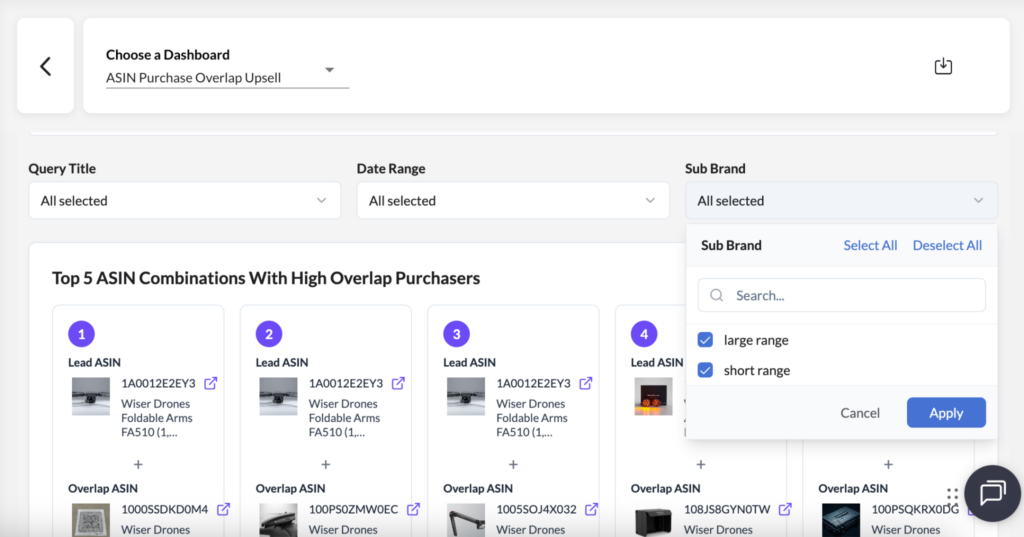
Tagging allows you to create distinctive rules for every sub-brand, for instance. In AMC, you can see your Shopper Abandoner dashboard broken out by sub-brand or another custom taxonomy.
Whatever option you choose—software or manual—it’s essential that you maintain strict naming conventions for your products and campaigns.
These naming conventions are the key to easily grouping your products according to custom taxonomies when it comes time to use AMC.
How do I take my custom taxonomies further?
So far, we’re focusing mostly on custom product groupings. But what if you want to take your segmentation further?
Think about how you segment your ad campaigns, for instance—like non-brand vs. brand campaigns.
When you run a path-to-purchase query, ou might want to see how those specifically segmented campaigns work in combination.
If you want to know how a branded keyword ad followed by a non-branded keyword ad lifts purchase rates, mixing your own custom logic into queries is how you can find out.
This is the future state of AMC use—where these kinds of granular product and media taxonomies that you value internally can be instantly reflected and manipulated in your AMC software.
It will mean AMC won’t only be a breeze to use—it will also generate results that reflect the nuances of your business.
(As always, you can read the full blog on our website here.)